
How to Use TrackServer – GPS Tracking App Guide
Our GPS tracking service is designed to be simple, secure, and easy to use. Once a tracker has been installed, clients can monitor a vehicle’s location in real time and review its location history using the TrackServer online platform.
Below is a step-by-step guide explaining how the process works.
Step 1: Tracker Installation
The GPS tracking process begins with the installation of a tracking device with 100% battery onto the vehicle.
-
The tracker is discreetly fitted by our team
-
Installation is quick and non-intrusive
-
The device remains hidden from view
Once installed, the tracker immediately begins transmitting location data.
Step 2: Login Details Provided
After installation, the client is issued with:
-
A unique username
-
A secure password
These login details allow access to the TrackServer app and the online portal, where all tracking data can be viewed.
Login credentials are confidential and should not be shared.

Step 3: Logging into TrackServer
Once logged in, you will be able to:
-
View the current live location of the tracker
-
See the vehicle displayed on an interactive map
-
Check timestamps for each recorded location
The system updates automatically as new data is received.
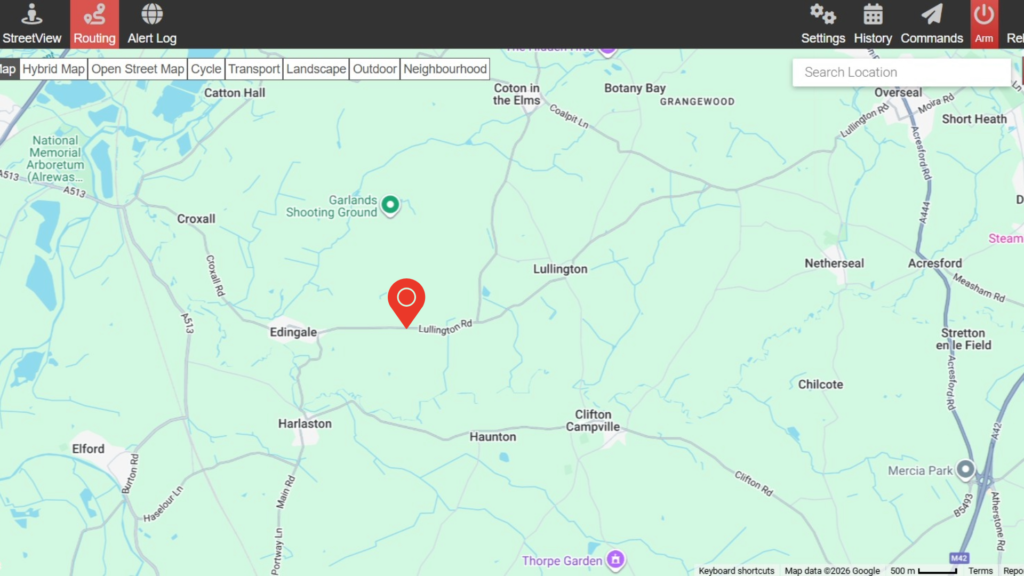
Illustrative Example Only
The image shown is a demonstration screenshot of the TrackServer platform.
The GPS location displayed does not relate to an active investigation or a client vehicle and was captured while a tracker was being transported for setup and testing purposes only.
No live operational tracking or personal data is shown.
Step 4: Viewing Location History
TrackServer allows you to review historical journey data, not just live tracking.
You can:
-
Select a specific date and time range
-
View previous routes and stop locations
-
Identify journey patterns and movement history
-
Confirm arrival and departure times
This feature is particularly useful for investigations, asset monitoring, and evidence gathering.
Need Help or Support?
If you require assistance using TrackServer, or if you have questions about your GPS tracking service, our team is available to help.
contact us